|
커뮤니티
|
|
커뮤니티 추천게시물
운영진 선정 | 추천순 | 최근댓글달린순 | 갤러리(포토)
커뮤니티 추천게시물
운영진 선정 | 추천순 | 최근댓글달린순 | 갤러리(포토)
커뮤니티 추천게시물
운영진 선정 | 추천순 | 최근댓글달린순 | 갤러리(포토)
커뮤니티 추천게시물
운영진 선정 | 추천순 | 최근댓글달린순 | 갤러리(포토)
|
|

|
|
|
 |
|
|
|
구글 크롬에서는 다운로드버튼이 작동하지 않으니, 엣지/익스플로러 등 다른브라우저를 사용하세요
|
|
안녕하세요.
2007년 6월 26일 NVIDIA홈페이지에 등록된 NVIDIA ForceWare v162.15 베타 드라이버 입니다.
Win2K/XP에서 동작하며 다국어를 지원합니다.
릴리즈된 내용은 다음과 같습니다.
Release Highlights:
1. Beta driver release.
2. Improved compatibility for Lost Planet.
3. Microsoft® DirectX® 9.0c and OpenGL® 2.1 support.
4. Numerous game and application compatibility fixes. Please read the release notes for more information on product support, feature limitations, driver fixes and known compatibility issues.
5. If you would like to be notified of upcoming drivers for Windows, please subscribe to the newsletter.
PureVideo™ HD support is currently only available on Microsoft Windows Vista for GeForce 8600, 8500 and 8400 GPUs. PureVideo HD support for Windows XP will be available an upcoming driver.
수정된 내용은 다음과 같습니다.
Fixed Issues?Windows XP 32-bit
Fixed Single-GPU Issues
GeForce 8 Series GPUs
? The NVIDIA Control Panel crashes when closing the nTune "NVPerformance Benchmark".[299621]
? GeForce 8800 GTX: NVIDIA Control Panel "Resize HDTV Desktop" (overscan compensation) sliders do not maintain their settings.[289632]
This issue is fixed with an NVIDIA?provided workaround to enable overscan compensation and allow the Resize HDTV Desktop sliders to work properly. See NVIDIA Knowledgebase Article #2064 for instructions.
? GeForce 8800 GTX: 1680x1050 resolution is not available when using the Dell 3007WFP monitor. [284181]
? GeForce 8800 GTX/GTS: Flat?panel scaling doesn't work with widescreen monitors. [309707]
? GeForce 8800 GTX: After changing the HDTV component format, the display either turns blank or reverts to the previous format.[279287]
? GeForce 8800 GTX: “This task cannot be opened now ...” message appears when clicking the NVIDIA Control Panel "Run multiple display wizard" navigation link after clicking the "Adjust video color settings" navigation link.[298477]
? GeForce 8800 GTX: Elder Scrolls: Oblivion?animation is visible through the trees when HDR and NVIDIA Control Panel antialiasing are enabled. [296265]
? GeForce 8800 GTX: S.T.A.L.K.E.R.?the crosshair is missing when antialiasing is enabled. [308826]
? GeForce 8800 GTX: Far Cry?blue?screen crash occurs after playing the game for awhile.[301780]
? GeForce 8800 GTX, GeForce 7900 GTX/7300 GS: Ghost Recon Advanced Warfighter 2? the game fails if you try to change settings right after the loading a mission. [308576]
? GeForce 8800 GTX: Lost Planet: Extreme Condition? the game crashes after the player destroys some objects in mission 01. [302251]
? GeForce 8600: The NVIDIA Control Panel "Setup multiple displays" page reverts back to the "Adjust image settings with preview" page after running 3DMark05.[297180]
? GeForce 8600: Rainbow Six Vegas?the game does not start when antialiasing is set to 8x, 8xQ, or 16x.[298195]
? GeForce 8500/8400/8300: “Could not create the Direct3D device” message appears when previewing a 3D screen saver in Dualview mode.[299992]
? GeForce 8600: On closing the NVIDIA Control Panel, the display configuration automatically switches from Clone mode to Singledisplay mode.[303542]
? GeForce 8500/8400/8300: The NVIDIA Control Panel “Resize HDTV Desktop” navigation link does not work consistently.[301312]
? GeForce 8500/8400/8300: With the resolution set to 1080i, the desktop cannot be changed from Dualview mode to Clone mode.[300058]
GeForce 7 Series GPUs
? Lock On: Modern Air Combat?graphics corruption occurs. [251807]
? NVIDIA Control Panel: Unable to run the NVIDIA Multiple Display wizard with any nView multi?display mode enabled. [220979]
? Interlaced HDTV formats cannot be set in the NVIDIA Control panel. [234045]
? The NVIDIA Control Panel: After selecting HD Component 480i/576P/720 format, the Color Quality slider in the Change Resolution page is grayed out. [219744]
? GeForce 7 Series: Video playback using PowerDVD shows a green line at the bottom of the screen. [255204]
? GeForce 7950 GX2: Video errors occur with HDTV output while processing 3D video. [324544/324541]
? GeForce 7900 GTX 512M : The NVIDIA Control panel Run Multiple Display wizard link does not work. [263295]
? GeForce 7900 GT/GS 256 MB, NVIDIA Control Panel: The Adjust Video Color Settings test image remains on the primary display after dragging the NVIDIA Control Panel to the secondary display.[236110]
? GeForce 7800 GT 256MB: 3DMark03?slow performance and video corruption occurs when running 3DMark03. [215804]
? GeForce 7800 GTX, Windows XP Media Center Edition 2005: The desktop goes blank while changing resolutions. [230674]
? GeForce 7800 GTX: The NVIDIA Control Panel “Modify full screen video options" feature is visible after enabling SLI mode.[301330]
? GeForce 7900 GTX: The NVIDIA Control Panel "Run Multiple Display wizard" can be opened while playing a video and no pop up "Task cannot be opened right now" warning message appears.[303529]
? GeForce 7900 GTX: Corruption and frame drops occur after enabling Hardware Acceleration in Cyberlink PowerDVD 7 while playing an HQV DVD.[305058]
? GeForce 7300 256MB: Error message appears on Windows Media Player 10 when changing the refresh rate of the secondary monitor.[243674 ]
GeForce 6 Series GPUs
? GeForce 6800 GTX: The Restore Defaults link is not available on the NVIDIA Control Panel "Modify full?screen video options" page the first time the page is visited.[301890]
? GeForce 6600 128MB: The Screen Resolution and Refresh rate page for the secondary Dualview display shows the wrong display mode information. [195196]
? GeForce 6600 256MB: After unplugging a Dualview display from the DVI or component output, the nView multi?display settings are still available. [210104]
? GeForce 6600 128MB: Full?screen video mirror is corrupted when playing a DVRMS format file using Windows Media Player 10.[234049]
? GeForce 6600, Windows XP Media Center Edition 2005 Update Rollup2: The system restarts while playing a video using MCE.[206545]
? GeForce 6600: There is corruption in the water in the Painkiller benchmark. [187899]
? GeForce 6600 GT: After hot unplugging a DVI monitor, the monitor is still recognized by the NVIDIA Control Panel. [260936]
GeForce FX Series GPUs
? GeForce FX 5700: Error message appears after enabling NVKeystone with NVRotate enabled in 1600x1200 mode. [196563]
Fixed SLI-Mode Issues
? [SLI]: Ghost Recon Advanced Warfighter?the desktop becomes corrupted after exiting the game when the SLI split line is enabled.[262737]
This issue did not occur when the SLI split line is disabled.
GeForce 8 Series GPUs
? [SLI], GeForce 8800 GTX: SLIAA doesn't turn off after switching back to “application controlled” under the NVIDIA Control Panel?>Manage 3D Settings page?>Antialiasing?Mode setting.[293282]
? [SLI], GeForce 8800 GTX: Blue?screen crash occurs when enaling SLI mode with a second monitor connected to the slave GPU.[298438]
? [SLI], GeForce 8800 GTX: After enabling SLI mode, the SLI animation on the NVIDIA Control Panel Set SLI Configuration page disappears.[295415]
? [SLI] GeForce 8800 GTX: Titan Quest?with V?Sync disabled, there are horizontal black lines during the intro video. [260416]
? [SLI], GeForce 8800 GTX: Splinter Cell:Double Agent?SLI mode does not work when the game is run through the front end launcher.[298601]
? [SLI], GeForce 8800 GTX: Dungeon Siege 2?there is a block of corruption around the mouse cursor.[297306]
? [SLI], GeForce 8800 GTX: Elder Scrolls: Oblivion?visual indicators do not display the correct information when SLI AA is enabled.[296267]
? [SLI], GeForce 8800/8600: Act of War?the cursor flickers when playing the game in multi?GPU AFR modes.[221369]
? [SLI], GeForce 8500/8400/8300: The NVIDIA Control Panel crashes after resuming from 3D screen saver preview in Dualview mode.[302725]
GeForce 7 Series GPUs
? [SLI], GeForce 7950 GX2 512MB Quad NVIDIA SLI: Civilization 4?white area of corruption with flickering appears while zooming out.[257464]
? [SLI], GeForce 7950 GX2, Quad NVIDIA SLI: Counter?Strike?with SLI mode enabled, a blue?screen crash occurs when changing the rendering mode from Direct 3D to OpenGL. [242851]
? [SLI], GeForce 7950 GX2, Quad NVIDIA SLI: Chronicles of Riddick?? VSync tear occurs when SLIAA8x is enabled. [246144]
? [SLI], GeForce 7950/7900 GT 256MB: Spellforce 2? flickering corruption appears in the frame with SLI mode enabled. [239308]
? [SLI], GeForce 7950 GX2 Quad NVIDIA SLI: Sid Meier's Pirates?video overlays are corrupt when SLI SFR mode is used. [221666]
? [SLI], GeForce 7950 GX2, GeForce 6800/6600: X3 Demo?Flickering occurs while running the X3 demo as a benchmark. [213708]
? [SLI], GeForce 7900 GTX: The image on the NVIDIA Control Panel "Set SLI Configuration" page disappears after clicking the “Monitor Temperature Level" main navigation tree item.[293140]
? [SLI], GeForce 7800 GTX: The NVIDIA Control Panel crashes if you enable SLI mode after invoking the screen saver several times.[302681]
? [SLI], GeForce 7300 GT: With SLI mode enabled, the command prompt is corrupted and flickering when the DOS box is view in fullscreen mode.[303214]
GeForce 6 Series GPUs
? [SLI], GeForce 6800: The NVIDIA Control Panel "Adjust Video color settings" page is corrupted when SLI is disabled.[296818]
지원하는 그래픽칩셋은 다음과 같습니다.
NVIDIA_BR02.DEV_00F1.1 = "NVIDIA GeForce 6600 GT"
NVIDIA_BR02.DEV_00F2.1 = "NVIDIA GeForce 6600"
NVIDIA_BR02.DEV_00F3.1 = "NVIDIA GeForce 6200"
NVIDIA_BR02.DEV_00F4.1 = "NVIDIA GeForce 6600 LE"
NVIDIA_BR02.DEV_00F5.1 = "NVIDIA GeForce 7800 GS"
NVIDIA_BR02.DEV_00F6.1 = "NVIDIA GeForce 6800 GS/XT"
NVIDIA_BR02.DEV_00F8.1 = "NVIDIA Quadro FX 3400/4400"
NVIDIA_BR02.DEV_00F9.1 = "NVIDIA GeForce 6800 Series GPU"
NVIDIA_BR02.DEV_00FA.1 = "NVIDIA GeForce PCX 5750"
NVIDIA_BR02.DEV_00FB.1 = "NVIDIA GeForce PCX 5900"
NVIDIA_BR02.DEV_00FC.1 = "NVIDIA GeForce PCX 5300"
NVIDIA_BR02.DEV_00FD.1 = "NVIDIA Quadro PCI-E Series"
NVIDIA_BR02.DEV_00FE.1 = "NVIDIA Quadro FX 1300"
NVIDIA_BR02.DEV_02E0.1 = "NVIDIA GeForce 7600 GT"
NVIDIA_BR02.DEV_02E1.1 = "NVIDIA GeForce 7600 GS"
NVIDIA_BR02.DEV_02E2.1 = "NVIDIA GeForce 7300 GT"
NVIDIA_BR02.DEV_02E3.1 = "NVIDIA GeForce 7900 GS"
NVIDIA_BR02.DEV_02E4.1 = "NVIDIA GeForce 7950 GT"
NVIDIA_C51.DEV_0240.1 = "NVIDIA GeForce 6150"
NVIDIA_C51.DEV_0241.1 = "NVIDIA GeForce 6150 LE"
NVIDIA_C51.DEV_0242.1 = "NVIDIA GeForce 6100"
NVIDIA_C51.DEV_0245.1 = "NVIDIA Quadro NVS 210S / NVIDIA GeForce 6150LE"
NVIDIA_C61.DEV_03D0.1 = "NVIDIA GeForce 6150SE nForce 430"
NVIDIA_C61.DEV_03D1.1 = "NVIDIA GeForce 6100 nForce 405"
NVIDIA_C61.DEV_03D2.1 = "NVIDIA GeForce 6100 nForce 400"
NVIDIA_C61.DEV_03D5.1 = "NVIDIA GeForce 6100 nForce 420"
NVIDIA_C68.DEV_053A.1 = "NVIDIA GeForce 7050 PV / NVIDIA nForce 630a"
NVIDIA_C68.DEV_053B.1 = "NVIDIA GeForce 7050 PV / NVIDIA nForce 630a "
NVIDIA_C68.DEV_053E.1 = "NVIDIA GeForce 7025 / NVIDIA nForce 630a"
NVIDIA_G70.DEV_0090.1 = "NVIDIA GeForce 7800 GTX"
NVIDIA_G70.DEV_0091.1 = "NVIDIA GeForce 7800 GTX "
NVIDIA_G70.DEV_0092.1 = "NVIDIA GeForce 7800 GT"
NVIDIA_G70.DEV_0093.1 = "NVIDIA GeForce 7800 GS "
NVIDIA_G70.DEV_0095.1 = "NVIDIA GeForce 7800 SLI"
NVIDIA_G70.DEV_009D.1 = "NVIDIA Quadro FX 4500"
NVIDIA_G71.DEV_0290.1 = "NVIDIA GeForce 7900 GTX"
NVIDIA_G71.DEV_0291.1 = "NVIDIA GeForce 7900 GT/GTO"
NVIDIA_G71.DEV_0292.1 = "NVIDIA GeForce 7900 GS "
NVIDIA_G71.DEV_0293.1 = "NVIDIA GeForce 7950 GX2"
NVIDIA_G71.DEV_0294.1 = "NVIDIA GeForce 7950 GX2 "
NVIDIA_G71.DEV_0295.1 = "NVIDIA GeForce 7950 GT "
NVIDIA_G71.DEV_029D.1 = "NVIDIA Quadro FX 3500"
NVIDIA_G71.DEV_029E.1 = "NVIDIA Quadro FX 1500"
NVIDIA_G71.DEV_029F.1 = "NVIDIA Quadro FX 4500 X2"
NVIDIA_G72.DEV_01D0.1 = "NVIDIA GeForce 7350 LE"
NVIDIA_G72.DEV_01D1.1 = "NVIDIA GeForce 7300 LE"
NVIDIA_G72.DEV_01D2.1 = "NVIDIA GeForce 7550 LE"
NVIDIA_G72.DEV_01D3.1 = "NVIDIA GeForce 7300 SE/7200 GS"
NVIDIA_G72.DEV_01DB.1 = "NVIDIA Quadro NVS 120M"
NVIDIA_G72.DEV_01DD.1 = "NVIDIA GeForce 7500 LE"
NVIDIA_G72.DEV_01DE.1 = "NVIDIA Quadro FX 350"
NVIDIA_G72.DEV_01DF.1 = "NVIDIA GeForce 7300 GS"
NVIDIA_G73.DEV_0390.1 = "NVIDIA GeForce 7650 GS"
NVIDIA_G73.DEV_0391.1 = "NVIDIA GeForce 7600 GT "
NVIDIA_G73.DEV_0392.1 = "NVIDIA GeForce 7600 GS "
NVIDIA_G73.DEV_0393.1 = "NVIDIA GeForce 7300 GT "
NVIDIA_G73.DEV_0394.1 = "NVIDIA GeForce 7600 LE"
NVIDIA_G73.DEV_0395.1 = "NVIDIA GeForce 7300 GT "
NVIDIA_G73.DEV_039E.1 = "NVIDIA Quadro FX 560"
NVIDIA_G80.DEV_0191.1 = "NVIDIA GeForce 8800 GTX"
NVIDIA_G80.DEV_0193.1 = "NVIDIA GeForce 8800 GTS"
NVIDIA_G80.DEV_0194.1 = "NVIDIA GeForce 8800 Ultra"
NVIDIA_G80.DEV_019D.1 = "NVIDIA Quadro FX 5600"
NVIDIA_G80.DEV_019E.1 = "NVIDIA Quadro FX 4600"
NVIDIA_G84.DEV_0400.1 = "NVIDIA GeForce 8600 GTS"
NVIDIA_G84.DEV_0402.1 = "NVIDIA GeForce 8600 GT"
NVIDIA_G86.DEV_0421.1 = "NVIDIA GeForce 8500 GT"
NVIDIA_G86.DEV_0422.1 = "NVIDIA GeForce 8400 GS"
NVIDIA_G86.DEV_0423.1 = "NVIDIA GeForce 8300 GS"
NVIDIA_NV30.DEV_0301.1 = "NVIDIA GeForce FX 5800 Ultra"
NVIDIA_NV30.DEV_0302.1 = "NVIDIA GeForce FX 5800"
NVIDIA_NV30.DEV_0308.1 = "NVIDIA Quadro FX 2000"
NVIDIA_NV30.DEV_0309.1 = "NVIDIA Quadro FX 1000"
NVIDIA_NV31.DEV_0311.1 = "NVIDIA GeForce FX 5600 Ultra"
NVIDIA_NV31.DEV_0312.1 = "NVIDIA GeForce FX 5600"
NVIDIA_NV31.DEV_0314.1 = "NVIDIA GeForce FX 5600XT"
NVIDIA_NV34.DEV_0320.1 = "NVIDIA GeForce FX 5200"
NVIDIA_NV34.DEV_0321.1 = "NVIDIA GeForce FX 5200 Ultra"
NVIDIA_NV34.DEV_0322.1 = "NVIDIA GeForce FX 5200 "
NVIDIA_NV34.DEV_0323.1 = "NVIDIA GeForce FX 5200LE"
NVIDIA_NV34.DEV_0326.1 = "NVIDIA GeForce FX 5500"
NVIDIA_NV34.DEV_0327.1 = "NVIDIA GeForce FX 5100"
NVIDIA_NV34.DEV_032A.1 = "NVIDIA Quadro NVS 55/280 PCI"
NVIDIA_NV34.DEV_032B.1 = "NVIDIA Quadro FX 500/FX 600"
NVIDIA_NV35.DEV_0330.1 = "NVIDIA GeForce FX 5900 Ultra"
NVIDIA_NV35.DEV_0331.1 = "NVIDIA GeForce FX 5900"
NVIDIA_NV35.DEV_0332.1 = "NVIDIA GeForce FX 5900XT"
NVIDIA_NV35.DEV_0333.1 = "NVIDIA GeForce FX 5950 Ultra"
NVIDIA_NV35.DEV_0334.1 = "NVIDIA GeForce FX 5900ZT"
NVIDIA_NV35.DEV_0338.1 = "NVIDIA Quadro FX 3000"
NVIDIA_NV35.DEV_033F.1 = "NVIDIA Quadro FX 700"
NVIDIA_NV36.DEV_0341.1 = "NVIDIA GeForce FX 5700 Ultra"
NVIDIA_NV36.DEV_0342.1 = "NVIDIA GeForce FX 5700"
NVIDIA_NV36.DEV_0343.1 = "NVIDIA GeForce FX 5700LE"
NVIDIA_NV36.DEV_0344.1 = "NVIDIA GeForce FX 5700VE"
NVIDIA_NV36.DEV_034E.1 = "NVIDIA Quadro FX 1100"
NVIDIA_NV40.DEV_0040.1 = "NVIDIA GeForce 6800 Ultra"
NVIDIA_NV40.DEV_0041.1 = "NVIDIA GeForce 6800"
NVIDIA_NV40.DEV_0042.1 = "NVIDIA GeForce 6800 LE"
NVIDIA_NV40.DEV_0043.1 = "NVIDIA GeForce 6800 XE"
NVIDIA_NV40.DEV_0044.1 = "NVIDIA GeForce 6800 XT"
NVIDIA_NV40.DEV_0045.1 = "NVIDIA GeForce 6800 GT"
NVIDIA_NV40.DEV_0047.1 = "NVIDIA GeForce 6800 GS"
NVIDIA_NV40.DEV_0048.1 = "NVIDIA GeForce 6800 XT "
NVIDIA_NV40.DEV_004E.1 = "NVIDIA Quadro FX 4000"
NVIDIA_NV41.DEV_00C0.1 = "NVIDIA GeForce 6800 GS "
NVIDIA_NV41.DEV_00C1.1 = "NVIDIA GeForce 6800 "
NVIDIA_NV41.DEV_00C2.1 = "NVIDIA GeForce 6800 LE "
NVIDIA_NV41.DEV_00C3.1 = "NVIDIA GeForce 6800 XT "
NVIDIA_NV41.DEV_00CC.1 = "NVIDIA Quadro FX Go1400"
NVIDIA_NV41.DEV_00CD.1 = "NVIDIA Quadro FX 3450/4000 SDI"
NVIDIA_NV41.DEV_00CE.1 = "NVIDIA Quadro FX 1400"
NVIDIA_NV43.DEV_0140.1 = "NVIDIA GeForce 6600 GT "
NVIDIA_NV43.DEV_0141.1 = "NVIDIA GeForce 6600 "
NVIDIA_NV43.DEV_0142.1 = "NVIDIA GeForce 6600 LE "
NVIDIA_NV43.DEV_0143.1 = "NVIDIA GeForce 6600 VE"
NVIDIA_NV43.DEV_0145.1 = "NVIDIA GeForce 6610 XL"
NVIDIA_NV43.DEV_0147.1 = "NVIDIA GeForce 6700 XL"
NVIDIA_NV43.DEV_014A.1 = "NVIDIA Quadro NVS 440"
NVIDIA_NV43.DEV_014C.1 = "NVIDIA Quadro FX 540M"
NVIDIA_NV43.DEV_014D.1 = "NVIDIA Quadro FX 550"
NVIDIA_NV43.DEV_014E.1 = "NVIDIA Quadro FX 540"
NVIDIA_NV43.DEV_014F.1 = "NVIDIA GeForce 6200 "
NVIDIA_NV44.DEV_0160.1 = "NVIDIA GeForce 6500"
NVIDIA_NV44.DEV_0161.1 = "NVIDIA GeForce 6200 TurboCache(TM)"
NVIDIA_NV44.DEV_0162.1 = "NVIDIA GeForce 6200SE TurboCache(TM)"
NVIDIA_NV44.DEV_0163.1 = "NVIDIA GeForce 6200 LE"
NVIDIA_NV44.DEV_0165.1 = "NVIDIA Quadro NVS 285"
NVIDIA_NV44.DEV_0169.1 = "NVIDIA GeForce 6250"
NVIDIA_NV44.DEV_016A.1 = "NVIDIA GeForce 7100 GS"
NVIDIA_NV44.DEV_0221.1 = "NVIDIA GeForce 6200 "
NVIDIA_NV44.DEV_0222.1 = "NVIDIA GeForce 6200 A-LE"
NVIDIA_NV45.DEV_0046.1 = "NVIDIA GeForce 6800 GT "
NVIDIA_NV48.DEV_0211.1 = "NVIDIA GeForce 6800 "
NVIDIA_NV48.DEV_0212.1 = "NVIDIA GeForce 6800 LE "
NVIDIA_NV48.DEV_0215.1 = "NVIDIA GeForce 6800 GT "
NVIDIA_NV48.DEV_0218.1 = "NVIDIA GeForce 6800 XT "
|
|
|
|
|
|
|
|
|
|
|
|
|
|
|
자료실 엑티브엑스 컴포넌트 호환성문제 최종공지 등록일 : 2015/5/21 조회 : 42500
|
|
|
|
|
|
|
|
|
업로드 용량 1GB에서 2GB로 증량 안내 등록일 : 2012/8/29 조회 : 44189
|
|
|
|
|
|
|
|
|
다이렉트 링크 차단 안내 등록일 : 2011/8/17 조회 : 46260
|
|
|
|
|
|
|
|
|
자료실 파일 등록형식 대폭 확대 등록일 : 2010/12/31 조회 : 45783
|
|
|
|
|
|
|
|
|
전 자료 초고속 서버로 이전 업그레이드 안내 등록일 : 2010/7/29 조회 : 46329
|
|
|
|
|
|
|
|
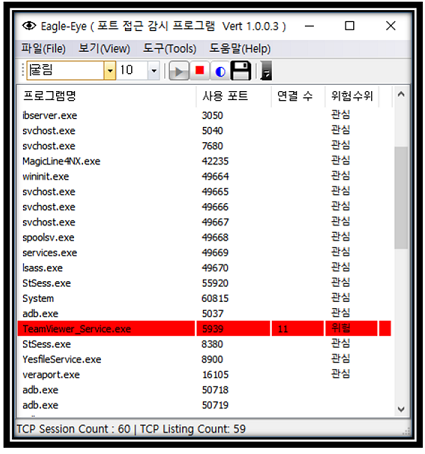
EagleEYEPort (TCP Port 모니터링)
|
|
카테고리 : 인터넷
사용OS : WIN64 |
등록회원 : KingT
등록일자 : 2019/1/30
|
조회수 : 41740
다운수 : 23
|
|
| 이글아이포트는 넷풀아이에서 일반 이용자를 위해서 만든 포트모니터링 프로그램입니다.
이글아이포트는 사용자 PC에서 열려있는 포트에 외부로부터의 접근 시도를 실시간 감시합니다.
이로써, 사용자는 PC에 외부에서의 해킹 시도를 실시간 파악할 수 있게 되어 PC를 안전하게 지킬 수 있게 도와주는 프로그램입니다.. |
|
|
|
|
|
[NVIDIA] GeForce v341.81 한글판 정식 드라이버 (Vista/Win7/Win8 64)
|
|
카테고리 : PC 공식드라이버
사용OS : WIN64 |
등록회원 : 제스트
등록일자 : 2015/8/28
|
조회수 : 47280
다운수 : 15
|
|
| 2015.8.24 일 자로 올라온 드라이버구요
용량은 269 메가
참고로 이전버전 제거하시고 현재버전 설치하시길 권장합니다
지포스 8100 부터 지포스 405 까지 설치하시면 됩니다
Vista/Win 7/Win 8/Win 8.1 64비트 전용
GeForce 400 Series:
GeForce 405
GeForce 300 Series:
GeForce GT 340, .. |
|
|
|
|
|
[NVIDIA] GeForce v341.81 한글판 정식 드라이버 (Vista/Win7/Win8 32)
|
|
카테고리 : PC 공식드라이버
사용OS : VISTA |
등록회원 : 제스트
등록일자 : 2015/8/28
|
조회수 : 46449
다운수 : 26
|
|
| 2015.8.24 일 자로 올라온 드라이버구요
용량은 216 메가
참고로 이전버전 제거하시고 현재버전 설치하시길 권장합니다
지포스 8100 부터 지포스 405 까지 설치하시면 됩니다
Vista/Win 7/Win 8/Win 8.1 32비트 전용
GeForce 400 Series:
GeForce 405
GeForce 300 Series:
GeForce GT 340, .. |
|
|
|
|
|
[NVIDIA] GeForce v355.60 WHQL 한글판 정식 드라이버 (Vista/Win7/Win8 64)
|
|
카테고리 : PC 공식드라이버
사용OS : WIN64 |
등록회원 : 제스트
등록일자 : 2015/8/14
|
조회수 : 44959
다운수 : 27
|
|
| 2015.8.13 일 자로 올라온 드라이버구요
용량은 279 메가
참고로 이전버전 제거하시고 현재버전 설치하시길 권장합니다
지포스 GT 420 이상 설치하시면 됩니다
Vista/Win 7/Win 8/Win 8.1 64비트 전용
GeForce 900 Series:
GeForce GTX 980 Ti, GeForce GTX 980, GeForce GTX 970, GeForce GTX 960.. |
|
|
|
|
|
[NVIDIA] GeForce v355.60 WHQL 한글판 정식 드라이버 (Vista/Win7/Win8 32)
|
|
카테고리 : PC 공식드라이버
사용OS : VISTA |
등록회원 : 제스트
등록일자 : 2015/8/14
|
조회수 : 43142
다운수 : 28
|
|
| 2015.8.13 일 자로 올라온 드라이버구요
용량은 218 메가
참고로 이전버전 제거하시고 현재버전 설치하시길 권장합니다
지포스 GT 420 이상 설치하시면 됩니다
Vista/Win 7/Win 8/Win 8.1 32비트 전용
GeForce 900 Series:
GeForce GTX TITAN X, GeForce GTX 980 Ti, GeForce GTX 980, GeForce G.. |
|
|
|
|
|
[NVIDIA] GeForce v355.60 WHQL 한글판 정식 드라이버 (XP 64)
|
|
카테고리 : PC 공식드라이버
사용OS : WINXP |
등록회원 : 제스트
등록일자 : 2015/8/14
|
조회수 : 42928
다운수 : 24
|
|
| 2015.8.13 일 자로 올라온 드라이버구요
용량은 239 메가
참고로 이전 버전 제거하시고 현재버전 설치하시길 권장합니다
지포스 GT420 이상이신분 설치하시면 됩니다
XP 64비트 전용
GeForce 900 Series:
GeForce GTX 960
GeForce 700 Series:
GeForce GTX TITAN Z, GeForce GTX TITAN Black, .. |
|
|
|
|
|
[NVIDIA] GeForce v355.60 WHQL 한글판 정식 드라이버 (XP)
|
|
카테고리 : PC 공식드라이버
사용OS : WINXP |
등록회원 : 제스트
등록일자 : 2015/8/14
|
조회수 : 46977
다운수 : 27
|
|
| 2015.8.13 일 자로 올라온 드라이버구요
용량은 194 메가
참고로 이전 버전 제거하시고 현재버전 설치하시길 권장합니다
지포스 GT420 이상이신분 설치하시면 됩니다
XP 전용
GeForce 900 Series:
GeForce GTX 960
GeForce 700 Series:
GeForce GTX TITAN Z, GeForce GTX TITAN Black, GeForce.. |
|
|
|
|
|
|
|
|
|