|
커뮤니티
|
|
커뮤니티 추천게시물
운영진 선정 | 추천순 | 최근댓글달린순 | 갤러리(포토)
커뮤니티 추천게시물
운영진 선정 | 추천순 | 최근댓글달린순 | 갤러리(포토)
커뮤니티 추천게시물
운영진 선정 | 추천순 | 최근댓글달린순 | 갤러리(포토)
커뮤니티 추천게시물
운영진 선정 | 추천순 | 최근댓글달린순 | 갤러리(포토)
|
|

|
|
|
 |
|
|
|
구글 크롬에서는 다운로드버튼이 작동하지 않으니, 엣지/익스플로러 등 다른브라우저를 사용하세요
|
|
ALi AGP Driver 1.82 입니다..( 원도9x/me/nt/2k/xp 용입니다. )
자세한것은 아래 내용을 참조바랍니다.
출처 : fdrsoft
ALi AGP Driver Version 1.82
------------
INTRODUCTION
------------
This file contains a variety of information you should read before
installing ALi AGP drivers. This setup program contains four drivers,
AgartD.VXD, ALiPCIMP.PCI, and ALiAGP.sys(Win2K/XP). AgartD.VXD is the
graphics address remapping table(GART) management for ALi chipsets at
Windows 95. ALiPCIMP.PCI is the PCI miniport driver providing PCI miniport
services at Windows 98/98SE/Me. ALiAGP.sys is the PCI miniport driver
providing PCI miniport services for Windows 2000 and Windows XP.
-------------------------
CONTENTS OF THIS DOCUMENT
-------------------------
This document contains the following sections:
1. System Requirements
2. Installation Instructions
3. Uninstallation Instructions
4. Manual Installation
5. Verifying Installation of the Driver
6. Verifying Validation of the AGP Functionality
7. Identifying the Drivers Version Number
8. Change List
9. Known issues
----------------------
1. System requirements
----------------------
Windows 95:
1. Microsoft Windows 95 OSR2.1 or later version
2. ALi AGP Driver (AgartD.VXD)
3. AGP VGA Card with Driver
4. Direct X5 or above
Windows 98/98SE/Me:
1. Microsoft Windows 98/98SE/Me
2. ALi AGP Driver (ALiPCIMP.PCI)
3. AGP VGA Card with Driver
Windows 2000/XP:
1. Microsoft Windows 2000(build 2195) or later version, or Windows XP.
2. ALi AGP Driver (ALiAGP.SYS)
3. AGP VGA Card with Driver
----------------------------
2. Installation Instructions
----------------------------
Windows 95:
1. Install Windows 95 OSR2 or later version.
2. Upgrade Windows 95 to version OSR2.1 by running USBSUPP.EXE.
We can get this file from Microsoft (www.microsoft.com).
If you install Windows 95 OSR2.5, you still need to install USBSUPP.EXE.
3. Install Microsoft DirectX 5.0 or later version.
We can get this driver from Microsoft too.
4. Install ALi AGP Driver
- run this install program.
- this program will detect the Windows version automatically
and modify the registry to load the proper driver.
5. Install VGA driver for Windows 95.
Windows 98/98SE/Me:
1. Install Windows 98/98SE/Me.
2. Install ALi AGP Driver
- run this install program.
- this program will detect the Windows version automatically
and modify the registry to load the proper driver.
3. Install VGA driver.
Windows 2000/XP:
1. Install Windows 2000/XP.
2. Press "F8" at Windows 2000/XP booting menu to select
Safe Mode if Windows 2000/XP fails to boot into.
3. Install ALi AGP Driver
- run this install program.
- this program will detect the Windows version automatically
and modify the registry to load the proper driver.
4. Install VGA driver.
Important note:
Many systems instability are caused by OS drivers internal confliction after
changing mainboard, graphics card, or even upgrading driver or BIOS. It
strongly recommends user to format your hard drive and re-install OS again
after you have ever done system/driver upgrading operation and system is not
stable.
------------------------------
3. Uninstallation Instructions
------------------------------
All OSes:
1. Open "Control Panel" folder
2. Invoke "Add/Remove Programs" icon
3. Choose "ALi AGP Driver 1.82" item
4. Click on "Add/Remove" button to remove drivers.
----------------------
4. Manual Installation
----------------------
Windows 95:
1. Copy AgartD.VXD to "<Windows root directory>\System\" directory.
2. Add a key "AGARTD" in the registry:
KEY:"HKEY_LOCAL_MACHINE\System\CurrentControlSet\Services\VxD\AGARTD"
with:
NAME:StaticVxD
DATA:"AgartD.VXD"
Windows 98/98SE/Me:
1. Extract AGP driver into a temporary directory.
2. Find "System devices" category in "System" s "Device Manager" tab of
"Control Panel".
3. Find "ALi M1541 AGP System Controller", "ALi AGP System Controller",
or "PCI standard host CPU bridge" device, depend on the ALi chipset you
use and whether older AGP driver has been installed or not.
4. Click on the "Properties" button, select "Driver" tab, and click on the
"Driver Update" button. Choose to install driver by providing driver
location manually, and give dialog box the address of right OS subfolder
under AGP driver temporary directory. System will find the driver to
install.
5. Reboot system to make new installed driver work.
Windows 2000/XP:
1. Extract AGP driver into a temporary directory.
2. Find "System devices" category in "System" s "Device Manager" tab of
"Control Panel".
3. Find ""ALi M1541 PCI to AGP Controller", "ALi PCI to AGP Controller",
or "PCI standard PCI-to-PCI bridge" device, depend on the ALi chipset you
use and whether older AGP driver has been installed or not.
4. Click on the "Properties" button, select "Driver" tab, and click on the
"Driver Update" button. Choose to install driver by providing driver
location manually, and give dialog box the address of right OS subfolder
under AGP driver temporary directory. System will find the driver to
install.
5. Reboot system to make new installed driver work.
-----------------------------------------
5. Verifying Installation of the Driver
-----------------------------------------
Windows 95:
To make sure if the ALI AGP driver is properly installed,
We need run "Regedit" and check whether the key AGARTD exists in
the following path
"HKEY_LOCAL_MACHINE\System\CurrentControlSet\Services\VxD"
for Windows 95
Windows 98/98SE/Me:
1. Run "Regedit" and find the NAME/DATA pair Path "ALiPCIMP.PCI" existing in
the following path
"HKEY_LOCAL_MACHINE\System\CurrentControlSet\Services\VxD\PCI\GARTMINIPORT\154110B9"
"HKEY_LOCAL_MACHINE\System\CurrentControlSet\Services\VxD\PCI\GARTMINIPORT\162110B9"
2. Find "System devices" category in "System" s "Device Manager" tab of "Control Panel".
You can find "ALi M1541 AGP System Controller" or "ALi M1621 AGP System Controller"
device, depend on the ALi chipset you use. Click on the "Properties" button, select
"Driver" tab, and click on the "Driver File Details" button, you can find the driver
provider and driver file version.
3. Run "drwatson" from Start menu. Select "Advanced View" from "View" menu and click
on "Kernel Drivers" tab. You can find "ALiPCIMP" in the Driver list and associated
version. If you can t find "ALiPCIMP" in the Driver list, ALi AGP driver is not loaded
in this system.
We recommend Method 3 to check whether ALi AGP driver is actually loaded for Windows 98/
98SE/Me.
Windows 2000/XP
Find "System devices" category in "System" s "Device Manager" tab of "Control Panel".
You can find "ALi M1541 PCI to AGP Controller" or "ALi PCI to AGP Controller"
device, depend on the ALi chipset you use. Click on the "Properties" button, select
"Driver" tab, and click on the "Driver Details" button, you can find the driver
provider and driver file version.
For users who have installed DirectX 8.0 or later:
Execute Dxdiag from Run command of Start menu. Click on Display tab. Check AGP Texture
Acceleration is enabled or not under Display Features. Note that sometimes AGP Texture
Acceleration not enabled doesn t mean ALI AGP driver is not properly installed.
------------------------------------------------
6. Verifying Validation of the AGP Functionality
------------------------------------------------
To check whether the AGP mechanism is able to activate, we can try the
following steps:
1. Install DirectX 8.0 (Windows XP doesn t need that).
2. Type "Dxdiag" to execute Dxdiag.exe from "Run" program of Start Menu.
3. Click the "Display" tab.
4. Check "AGP Texture Acceleration" of DirectX features is enabled or not.
-----------------------------------------
7. Identifying the Drivers Version Number
-----------------------------------------
Windows 95 & 98/98SE/Me:
The version of the drivers can be obtained by querying the driver file s
properties under File Manager.
After installation, the following driver are stored as listed.
<Windows directory>\System\AgartD.VXD
<Windows directory>\System\ALiPCIMP.PCI
1. Invoke the "Explorer" application.
2. Select the driver file.
3. Open the "File" menu.
4. Click on the "Properties" item.
5. Click on the "Version" tab.
6. The driver s version should be listed in the "File version" or "Product
Version".
Windows 98/98SE/Me only:
See Windows 98/98SE/Me method 2 & 3 at Section 5.
Windows 2000/XP
See Windows 2000/XP at Section 5.
--------------
8. Change List
--------------
V1.82
1. Improve system stability for PCI TV card.
2. Improve support of VIA Cyrix Processor under Win98/Me.
V1.81
1. Improve the functionality of HCT 10.0 Test under Windows XP.
2. Improve the support of ALi new Device under Win95/98/Me/2000/XP.
3. Improve the functionality of "Restart" under Win95.
V1.80
1. Improve 1.73 S4 resume functionality under Windows 2000.
2. Improve system stability for Ati Rage128 series.
3. Improve system stability for PCI TV card.
4. Add registry key to make Windows 95/98/ME/2000 driver communicates with
ALi AGP utility.
V1.73
1. Add registry key to make Windows 2000 driver communicates with ALi
AGP utility.
V1.72
1. Support Cyrix III Processor.
V1.70
1. Improve system stability for Matrox G400 DH in Windows 2000.
V1.68
1. Add Windows 2000 AGP driver.
V1.67
1. Correct frame buffer starting address to improve system stability
with some 1541 mainboards.
2. Improve 3D stability for Matrox Millennium II.
3. Improve system stability in PCI mode.
4. Enable K6-2/K6-3 Write-Allocate with TNT/TNT2/Geforce/G400 cards.
5. Improve system stability with Permedia3 cards.
6. Improve DVD playback issue on M1541 and ATI Rage 128.
7. Improve system stability with AGP cards without Side Band Address
on M1621.
V1.66
1. Add AMD K6 Write-Allocate feature
V1.64
1. Add support for Matrox G400.
2. Add support for 3DLabs Permedia3.
3. Fix some texture corruption syndrome seen on M1541 and TNT2 Model 64 based system.
4. Fix M1541 system instability after resuming from suspend in Windows 98SE ACPI mode.
5. Improve system stability with some TNT2 cards.
6. Improve system stability with some Savage4 cards.
V1.60
1. Fix nVidia TNT playing DVD frame drop.
2. Fix Window 95 system auto resets when using a PCI card and driver v1.53.
V1.54
1. Add support for ATI Rage Mobility AGP/Rage Pro XL AGP/Rage Pro XC AGP.
2. Add support for nVidia TNT2/Vanta.
3. Add support for 3Dfx Voodoo3.
4. Fix 3Dfx Banshee/Voodoo3 performance drop using ALi AGP driver v1.53.
V1.53
1. Support Windows 95(OSR2.1)/Windows 98/Windows 98SE.
2. ALi AGP Driver 1.53 add registry key to help Windows98 Device Manager to display proper
chipset driver properties, like Provider, Date, Version.
3. Support AMD K6-2 CXT core/K6-III MTRR feature. When ALi AGP Driver 1.53 detects a AMD CXT
core CPU, it sets up MTRR to enable this feature.
4. S3 Savage3D is not stable on M1621 system, ALi AGP Driver 1.53 has solved this problem.
5. ALi AGP Driver 1.50 does not work well in Win98 with the Savage4. System may turn into
BSOD(Blue Screen Of Death). ALi AGP Driver 1.53 has solved this problem.
6. System may turn into BSOD when executing Turok on Intel i740 and M1621 based system. ALi
AGP Driver 1.53 has solved this problem.
7. Solve system poor performance for Intel i740 in Windows 95. Need Intel i740 driver version
v3.2.
8. Asus P5A bios 1005 sets up M1541 GAT mode and this will cause problem in ATI Rage 128.
ALi AGP Driver 1.53 has solved this problem.
---------------
9. Known issues
---------------
Windows 95 & 98/98SE/Me:
1. Fix DVD playback issue of Rage 128GL and Rage 128VR on M1541 by setting
AGP data rate to 1X.
2. Fix some texture corruption syndrome of TNT2 M64 and TNT2 Vanta on M1541
by setting AGP data rate to 1X.
Windows 2000/XP:
1. End users should download Windows 2000/XP VGA drivers from
VGA vendor web site to upgrade default VGA drivers if default VGA driver
seems not to work properly, like D3D or AGP Texture Acceleration not enabled.
Note: If you do not want to set AGP data rate to 1X, you can use ALi AGP
utility to set AGP data rate to 2X but you may encounter some system instability
issues.
Acer Laboratories Inc. (ALi) web sites:
http://www.ali.com.tw/ (Taiwan)
http://www.acerlabs.com/ (America)
|
| |
0
|
|
좋은 내용의 글이라면 추천해주세요.
로그인을 하지 않아도 추천 하실 수 있습니다. |
|
|
|
|
|
|
|
|
|
|
|
|
|
|
|
자료실 엑티브엑스 컴포넌트 호환성문제 최종공지 등록일 : 2015/5/21 조회 : 42489
|
|
|
|
|
|
|
|
|
업로드 용량 1GB에서 2GB로 증량 안내 등록일 : 2012/8/29 조회 : 44179
|
|
|
|
|
|
|
|
|
다이렉트 링크 차단 안내 등록일 : 2011/8/17 조회 : 46246
|
|
|
|
|
|
|
|
|
자료실 파일 등록형식 대폭 확대 등록일 : 2010/12/31 조회 : 45769
|
|
|
|
|
|
|
|
|
전 자료 초고속 서버로 이전 업그레이드 안내 등록일 : 2010/7/29 조회 : 46318
|
|
|
|
|
|
|
|
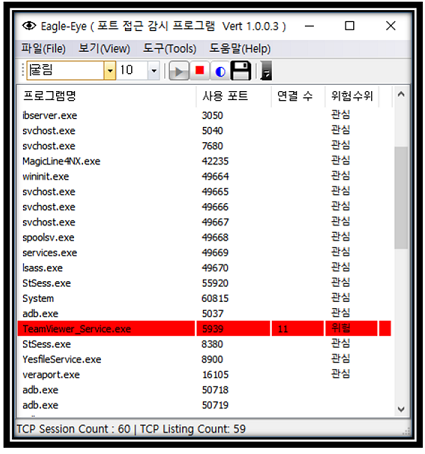
EagleEYEPort (TCP Port 모니터링)
|
|
카테고리 : 인터넷
사용OS : WIN64 |
등록회원 : KingT
등록일자 : 2019/1/30
|
조회수 : 41723
다운수 : 22
|
|
| 이글아이포트는 넷풀아이에서 일반 이용자를 위해서 만든 포트모니터링 프로그램입니다.
이글아이포트는 사용자 PC에서 열려있는 포트에 외부로부터의 접근 시도를 실시간 감시합니다.
이로써, 사용자는 PC에 외부에서의 해킹 시도를 실시간 파악할 수 있게 되어 PC를 안전하게 지킬 수 있게 도와주는 프로그램입니다.. |
|
|
|
|

|
[NVIDIA] GeForce v341.81 한글판 정식 드라이버 (Vista/Win7/Win8 64)
|
|
카테고리 : PC 공식드라이버
사용OS : WIN64 |
등록회원 : 제스트
등록일자 : 2015/8/28
|
조회수 : 47262
다운수 : 11
|
|
| 2015.8.24 일 자로 올라온 드라이버구요
용량은 269 메가
참고로 이전버전 제거하시고 현재버전 설치하시길 권장합니다
지포스 8100 부터 지포스 405 까지 설치하시면 됩니다
Vista/Win 7/Win 8/Win 8.1 64비트 전용
GeForce 400 Series:
GeForce 405
GeForce 300 Series:
GeForce GT 340, .. |
|
|
|
|

|
[NVIDIA] GeForce v341.81 한글판 정식 드라이버 (Vista/Win7/Win8 32)
|
|
카테고리 : PC 공식드라이버
사용OS : VISTA |
등록회원 : 제스트
등록일자 : 2015/8/28
|
조회수 : 46434
다운수 : 23
|
|
| 2015.8.24 일 자로 올라온 드라이버구요
용량은 216 메가
참고로 이전버전 제거하시고 현재버전 설치하시길 권장합니다
지포스 8100 부터 지포스 405 까지 설치하시면 됩니다
Vista/Win 7/Win 8/Win 8.1 32비트 전용
GeForce 400 Series:
GeForce 405
GeForce 300 Series:
GeForce GT 340, .. |
|
|
|
|

|
[NVIDIA] GeForce v355.60 WHQL 한글판 정식 드라이버 (Vista/Win7/Win8 64)
|
|
카테고리 : PC 공식드라이버
사용OS : WIN64 |
등록회원 : 제스트
등록일자 : 2015/8/14
|
조회수 : 44945
다운수 : 25
|
|
| 2015.8.13 일 자로 올라온 드라이버구요
용량은 279 메가
참고로 이전버전 제거하시고 현재버전 설치하시길 권장합니다
지포스 GT 420 이상 설치하시면 됩니다
Vista/Win 7/Win 8/Win 8.1 64비트 전용
GeForce 900 Series:
GeForce GTX 980 Ti, GeForce GTX 980, GeForce GTX 970, GeForce GTX 960.. |
|
|
|
|

|
[NVIDIA] GeForce v355.60 WHQL 한글판 정식 드라이버 (Vista/Win7/Win8 32)
|
|
카테고리 : PC 공식드라이버
사용OS : VISTA |
등록회원 : 제스트
등록일자 : 2015/8/14
|
조회수 : 43124
다운수 : 25
|
|
| 2015.8.13 일 자로 올라온 드라이버구요
용량은 218 메가
참고로 이전버전 제거하시고 현재버전 설치하시길 권장합니다
지포스 GT 420 이상 설치하시면 됩니다
Vista/Win 7/Win 8/Win 8.1 32비트 전용
GeForce 900 Series:
GeForce GTX TITAN X, GeForce GTX 980 Ti, GeForce GTX 980, GeForce G.. |
|
|
|
|

|
[NVIDIA] GeForce v355.60 WHQL 한글판 정식 드라이버 (XP 64)
|
|
카테고리 : PC 공식드라이버
사용OS : WINXP |
등록회원 : 제스트
등록일자 : 2015/8/14
|
조회수 : 42911
다운수 : 22
|
|
| 2015.8.13 일 자로 올라온 드라이버구요
용량은 239 메가
참고로 이전 버전 제거하시고 현재버전 설치하시길 권장합니다
지포스 GT420 이상이신분 설치하시면 됩니다
XP 64비트 전용
GeForce 900 Series:
GeForce GTX 960
GeForce 700 Series:
GeForce GTX TITAN Z, GeForce GTX TITAN Black, .. |
|
|
|
|

|
[NVIDIA] GeForce v355.60 WHQL 한글판 정식 드라이버 (XP)
|
|
카테고리 : PC 공식드라이버
사용OS : WINXP |
등록회원 : 제스트
등록일자 : 2015/8/14
|
조회수 : 46962
다운수 : 22
|
|
| 2015.8.13 일 자로 올라온 드라이버구요
용량은 194 메가
참고로 이전 버전 제거하시고 현재버전 설치하시길 권장합니다
지포스 GT420 이상이신분 설치하시면 됩니다
XP 전용
GeForce 900 Series:
GeForce GTX 960
GeForce 700 Series:
GeForce GTX TITAN Z, GeForce GTX TITAN Black, GeForce.. |
|
|
|
|
|
|
|
|
|