|
커뮤니티
|
|
커뮤니티 추천게시물
운영진 선정 | 추천순 | 최근댓글달린순 | 갤러리(포토)
커뮤니티 추천게시물
운영진 선정 | 추천순 | 최근댓글달린순 | 갤러리(포토)
커뮤니티 추천게시물
운영진 선정 | 추천순 | 최근댓글달린순 | 갤러리(포토)
커뮤니티 추천게시물
운영진 선정 | 추천순 | 최근댓글달린순 | 갤러리(포토)
|
|

|
|
|
 |
|
|
|
구글 크롬에서는 다운로드버튼이 작동하지 않으니, 엣지/익스플로러 등 다른브라우저를 사용하세요
|
|
*버전 : 4.0 (32Bit, 64Bit)
*업데이트날짜 : 2011.3.7
*출처 : http://www.rarlab.com
*What's new
Version 4.00
1. RAR decompression speed is improved. Depending on data type,
decompression can be up to 30% faster than in previous versions.
Both the general RAR algorithm and most of special RAR multimedia
methods benefit from this improvement. The only module of RAR
algorithm, which is not affected, is "Text compression" method.
2. Changes in ISO support:
a) UDF support is upgraded to UDF 2.50 revision. It makes possible
to unpack most of Blu-ray ISO files;
b) when browsing UDF ISO file, UDF revision number is displayed
after the "UDF" format name in WinRAR address bar
and in archive information dialog;
c) WinRAR sets the folder modification date when unpacking folders
stored in UDF and ISO9660 files.
3. Changes in password dialog:
a) WinRAR uses the same format of password dialog both when archiving
and extracting, so "Show password" option is available also
when extracting;
b) "Organize passwords..." button in password dialog provides
access to password organizer interface, where you can specify
your frequently used passwords. You will be able to access these
saved passwords using the drop down list or autocomplete feature
in password dialog.
It is important to know that saved passwords are not encrypted
and anybody having access to your computer can view them.
Use "Organize passwords" feature only if your computer is
protected from unauthorized access;
c) "Use for all archives" option is available in password dialog
when unpacking several archives at once. You can utilize it
to apply an entered password to all archives.
If you use this option with an empty password, WinRAR will skip
all encrypted archives;
d) Unlike previous versions, the password from default compression
profile is not used for extraction.
If you wish to use the same password for all extracting archives,
press "Organize passwords..." button in the password dialog
and define a new password entry, specifying "*" file mask
in "Select for archives" field.
4. In Windows 7 WinRAR will display the total operation progress
also on WinRAR icon on Windows taskbar. You can disable it using
"Taskbar progress bar" option on "General" page of WinRAR settings.
5. Numerous Unicode support improvements allow to process non-English
file names more smoothly. These improvements include:
a) better Unicode handling in WinRAR in "Rename", "Convert",
"Find" and other commands, in folder tree panel, in password
request dialog and in many other parts of WinRAR interface;
b) correctly displayed Unicode names in WinRAR items in Explorer
context menus;
c) Unicode support in .lng files, making WinRAR localization
possible for Unicode only languages.
6. Changes in -x switch syntax. Now you can specify a wildcard
exclusion mask for folders. Such mask must have the trailing '\'
character, like -x*tmp*\ or -x*\temp\
7. New "Extract relative paths" option in "Advanced" part of extraction
dialog. If you browse some archive subfolder in WinRAR shell
and enable "Extract relative paths" option, the path part up to
and including the current subfolder will be removed from extracted
file paths.
For example, if you are inside of "Backup\MyData" archive folder
and extract "Images" folder, it will be extracted as "Images",
not as "Backup\MyData\Images".
This option is the new default extraction mode, but you can change
the default back to WinRAR 3.x style. Just select "Extract full paths"
and then press "Save settings" in "General" part of extraction dialog.
8. Windows 98, Windows Me and Windows NT are not supported by WinRAR
and WinRAR self-extracting modules anymore. Minimum Windows version
required for WinRAR 4.0 is Windows 2000.
If you need to run WinRAR on older Windows, you can download
previous WinRAR versions from ftp://ftp.rarlab.com/rar
9. If TAR, TAR.GZ or TAR.BZ2 archive contains symbolic or hard links
and if destination file system is NTFS, WinRAR will create these
links when unpacking such archive. WinRAR will create symbolic links
as symbolic and hard links as hard in Windows Vista and newer
and it will create all links as hard in older Windows.
If destination file system is FAT32 or any other not supporting
file links, WinRAR will skip links when unpacking TAR, TAR.GZ
and TAR.BZ2 archives.
10. Recovery volume processing involves less disk seek operations
resulting in higher performance.
11. You can select Windows 7 library in tree panel in extraction dialog
and WinRAR will use its default save location as the destination path.
12. "Report" command allows to select HTML, Unicode text and usual text
as output format for report file. Unlike previous WinRAR versions,
now WinRAR preservers Unicode characters in reports when using HTML
or Unicode text format. So non-English characters in file names
will be displayed properly in such reports.
13. Message list in GUI SFX archives displays only operation status
and error messages. It does not contain names of all extracted files
anymore. This change improves the speed and reduces memory requirements
for SFX archives containing a large number of files. Also it makes
easier to locate error messages, because they are not hidden among
extracted file names.
14. GUI SFX archives display "Extract" button instead of "Install"
if no "Setup" or "Presetup" commands are present in the archive
comment. If you prefer "Install" button, but do not need to
execute any setup programs, you can add "Setup=<>" command.
15. WinRAR displays the current percent above the operation progress bar
when repairing an archive containing the recovery record
and when processing recovery volumes.
16. WinRAR limits the maximum possible volume size to 4 GB minus 1 byte
when creating RAR volumes on a disk with FAT or FAT32 file system
in volume size autodetecting mode. These file systems do not support
4 GB and larger files.
17. If "Wait if other WinRAR copies are active" option is enabled
and WinRAR waits for another copy, you can press "Continue" button
in command progress window to force WinRAR to stop waiting.
So now "Continue" button allows to override the state of
"Wait if other WinRAR copies are active" option for current operation.
18. WinRAR displays one password request instead of two, when saving
an encrypted file back to RAR or ZIP archive after modifying it
in some external editor. Previous WinRAR versions usually requested
the password twice, both when extracting the original file
and archiving its modified copy. Only RAR archives with encrypted
file names were processed with the single password prompt.
19. New error code 10 ("no files") is added to list of error codes
returned in command line mode by RAR and WinRAR. This new code
can be returned by archive, extract, delete and repair commands.
It means that RAR did not find any files matched the specified
file or archive mask.
20. File name area in file overwrite dialog occupies several lines now.
It makes possible to display much longer names.
21. Now switch -ep3 converts not only disk letters, but also UNC paths.
So \\server\share will be converted to __server\share when archiving
and restored to the original \\server\share when extracting with -ep3.
22. New "Background extraction" option in "Advanced" part of extraction
dialog places WinRAR into background, when extracting files.
You can save its default state with "Save settings" button in "General"
part of extraction dialog, just like for other extraction options.
"Background archiving" option from the default compression profile
does not affect the extraction behavior anymore.
23. "Mode..." button in operation progress window is enabled also
when extracting or testing archives. It provides access to
"Command parameters" dialog, where you can set "Turn PC off when done"
option for extraction and test operations.
Previously this dialog was accessible only when archiving.
24. Bugs fixed:
a) renaming a file in archive could also rename all other files
with the same name in other folders of the same archive;
b) previous versions displayed the wrong total packed size
in "Info" command for multivolume CAB archives;
c) in ZIP archives 'U' (update) and 'F' (fresh) commands could
erroneously update even files not specified in the command line.
It happened only for files in current folder which names matched
files in ZIP archive. This bug was not present in usual 'A' (add)
archiving mode.
|
| |
5
|
쉐그 님의 다른글 보기

|
좋은 내용의 글이라면 추천해주세요.
로그인을 하지 않아도 추천 하실 수 있습니다. |
|
|
|
|
|
|
|
|
|
|
|
|
|
|
|
자료실 엑티브엑스 컴포넌트 호환성문제 최종공지 등록일 : 2015/5/21 조회 : 42498
|
|
|
|
|
|
|
|
|
업로드 용량 1GB에서 2GB로 증량 안내 등록일 : 2012/8/29 조회 : 44188
|
|
|
|
|
|
|
|
|
다이렉트 링크 차단 안내 등록일 : 2011/8/17 조회 : 46258
|
|
|
|
|
|
|
|
|
자료실 파일 등록형식 대폭 확대 등록일 : 2010/12/31 조회 : 45783
|
|
|
|
|
|
|
|
|
전 자료 초고속 서버로 이전 업그레이드 안내 등록일 : 2010/7/29 조회 : 46328
|
|
|
|
|
|
|
|
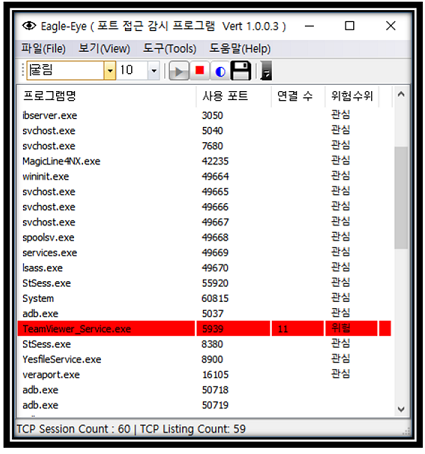
EagleEYEPort (TCP Port 모니터링)
|
|
카테고리 : 인터넷
사용OS : WIN64 |
등록회원 : KingT
등록일자 : 2019/1/30
|
조회수 : 41737
다운수 : 23
|
|
| 이글아이포트는 넷풀아이에서 일반 이용자를 위해서 만든 포트모니터링 프로그램입니다.
이글아이포트는 사용자 PC에서 열려있는 포트에 외부로부터의 접근 시도를 실시간 감시합니다.
이로써, 사용자는 PC에 외부에서의 해킹 시도를 실시간 파악할 수 있게 되어 PC를 안전하게 지킬 수 있게 도와주는 프로그램입니다.. |
|
|
|
|
|
[NVIDIA] GeForce v341.81 한글판 정식 드라이버 (Vista/Win7/Win8 64)
|
|
카테고리 : PC 공식드라이버
사용OS : WIN64 |
등록회원 : 제스트
등록일자 : 2015/8/28
|
조회수 : 47276
다운수 : 15
|
|
| 2015.8.24 일 자로 올라온 드라이버구요
용량은 269 메가
참고로 이전버전 제거하시고 현재버전 설치하시길 권장합니다
지포스 8100 부터 지포스 405 까지 설치하시면 됩니다
Vista/Win 7/Win 8/Win 8.1 64비트 전용
GeForce 400 Series:
GeForce 405
GeForce 300 Series:
GeForce GT 340, .. |
|
|
|
|
|
[NVIDIA] GeForce v341.81 한글판 정식 드라이버 (Vista/Win7/Win8 32)
|
|
카테고리 : PC 공식드라이버
사용OS : VISTA |
등록회원 : 제스트
등록일자 : 2015/8/28
|
조회수 : 46447
다운수 : 26
|
|
| 2015.8.24 일 자로 올라온 드라이버구요
용량은 216 메가
참고로 이전버전 제거하시고 현재버전 설치하시길 권장합니다
지포스 8100 부터 지포스 405 까지 설치하시면 됩니다
Vista/Win 7/Win 8/Win 8.1 32비트 전용
GeForce 400 Series:
GeForce 405
GeForce 300 Series:
GeForce GT 340, .. |
|
|
|
|
|
[NVIDIA] GeForce v355.60 WHQL 한글판 정식 드라이버 (Vista/Win7/Win8 64)
|
|
카테고리 : PC 공식드라이버
사용OS : WIN64 |
등록회원 : 제스트
등록일자 : 2015/8/14
|
조회수 : 44959
다운수 : 27
|
|
| 2015.8.13 일 자로 올라온 드라이버구요
용량은 279 메가
참고로 이전버전 제거하시고 현재버전 설치하시길 권장합니다
지포스 GT 420 이상 설치하시면 됩니다
Vista/Win 7/Win 8/Win 8.1 64비트 전용
GeForce 900 Series:
GeForce GTX 980 Ti, GeForce GTX 980, GeForce GTX 970, GeForce GTX 960.. |
|
|
|
|
|
[NVIDIA] GeForce v355.60 WHQL 한글판 정식 드라이버 (Vista/Win7/Win8 32)
|
|
카테고리 : PC 공식드라이버
사용OS : VISTA |
등록회원 : 제스트
등록일자 : 2015/8/14
|
조회수 : 43139
다운수 : 28
|
|
| 2015.8.13 일 자로 올라온 드라이버구요
용량은 218 메가
참고로 이전버전 제거하시고 현재버전 설치하시길 권장합니다
지포스 GT 420 이상 설치하시면 됩니다
Vista/Win 7/Win 8/Win 8.1 32비트 전용
GeForce 900 Series:
GeForce GTX TITAN X, GeForce GTX 980 Ti, GeForce GTX 980, GeForce G.. |
|
|
|
|
|
[NVIDIA] GeForce v355.60 WHQL 한글판 정식 드라이버 (XP 64)
|
|
카테고리 : PC 공식드라이버
사용OS : WINXP |
등록회원 : 제스트
등록일자 : 2015/8/14
|
조회수 : 42927
다운수 : 24
|
|
| 2015.8.13 일 자로 올라온 드라이버구요
용량은 239 메가
참고로 이전 버전 제거하시고 현재버전 설치하시길 권장합니다
지포스 GT420 이상이신분 설치하시면 됩니다
XP 64비트 전용
GeForce 900 Series:
GeForce GTX 960
GeForce 700 Series:
GeForce GTX TITAN Z, GeForce GTX TITAN Black, .. |
|
|
|
|
|
[NVIDIA] GeForce v355.60 WHQL 한글판 정식 드라이버 (XP)
|
|
카테고리 : PC 공식드라이버
사용OS : WINXP |
등록회원 : 제스트
등록일자 : 2015/8/14
|
조회수 : 46974
다운수 : 24
|
|
| 2015.8.13 일 자로 올라온 드라이버구요
용량은 194 메가
참고로 이전 버전 제거하시고 현재버전 설치하시길 권장합니다
지포스 GT420 이상이신분 설치하시면 됩니다
XP 전용
GeForce 900 Series:
GeForce GTX 960
GeForce 700 Series:
GeForce GTX TITAN Z, GeForce GTX TITAN Black, GeForce.. |
|
|
|
|
|
|
|
|
|