|
커뮤니티
|
|
커뮤니티 추천게시물
운영진 선정 | 추천순 | 최근댓글달린순 | 갤러리(포토)
커뮤니티 추천게시물
운영진 선정 | 추천순 | 최근댓글달린순 | 갤러리(포토)
커뮤니티 추천게시물
운영진 선정 | 추천순 | 최근댓글달린순 | 갤러리(포토)
커뮤니티 추천게시물
운영진 선정 | 추천순 | 최근댓글달린순 | 갤러리(포토)
|
|

|
|
|
 |
|
|
|
구글 크롬에서는 다운로드버튼이 작동하지 않으니, 엣지/익스플로러 등 다른브라우저를 사용하세요
|
|
2013년 5월 23일 업데이트된 그래픽카드 오버클럭 유틸리티 EVGA Precision X v4.2.0 입니다.
Windows 7, Vista, XP(32/64-bit)에서 동작하며 GeForce 600, 500, 400, 200 시리즈 그래픽카드를 지원합니다.
업데이트 내용은 다음과 같습니다.
•New Default Skin, legacy skins are available from the Options > User Interface tab
•Improved NVAPI access layer architecture with better extendibility
•Improved hardware monitoring module architecture with better extendibility
•Added temperature limit, power limit, voltage limit, maximum overvoltage limit and GPU utilization limit graphs to hardware monitoring module for release 320 and newer NVIDIA driver. The graphs help you to understand the reasons of realtime performance limitations (e.g. limiting performance due to reaching power target) on GPU Boost compatible graphics cards
•Added framebuffer, video engine and bus controller usage graphs to hardware monitoring module
•Added generic NVAPI videomemory usage monitoring for NVIDIA graphics cards unattached to Windows desktop (e.g. dedicated PhysX accelerators)
•Updated power reporting for release 320 and newer NVIDIA drivers. Now EVGA Precision X reports normalized total power according to NVIDIA recommendations
•Now RivaTuner Statistics Server installer is being started by EVGA Precision X installer to make installation process easier for beginners. The server distributive is being copied to .\Redist\RTSSSetup.exe during EVGA Precision X installation, so you may always install it later if necessary
•Added workaround for missing tray icon when starting application while EXPLORER.EXE is not responding
•Application tray icon is now being restored after restarting EXPLORER.EXE
•Build number is now displayed in “i” window and in application tray icon tooltip
•Localizable installer files for third party translators are now included in distributive in .\SDK\Localization\Installer folder
•RivaTuner Statistics Server distributive has been upgraded to version 5.1.2: ◦Added update checking system
◦Added version checking system to installer. Now the installer is giving you a warning when you’re trying to install older or reinstall currently installed version of the server
◦Added client notification system to installer. Now the installer is notifying client applications like EVGA Precision in the end of the server installation process to allow the clients to restart themselves
◦Added workaround for missing tray icon when starting application while EXPLORER.EXE is not responding
◦Application tray icon is now being restored after restarting EXPLORER.EXE
◦Fixed issue with newly added profiles not being automatically selected in the profiles list
◦Added keyboard navigation support for profiles list
◦Added On-Screen Display profile for Medal of Honor: Allied Assault
◦Improved reboot notifications for locked files installation/uninstallation
◦Now RivaTuner Statistics Server prevents attempts to start application without rebooting the system in case of using delayed locked files update scenario during installation
◦Added screen capture support for fullscreen Direct3D7 and DirectDraw applications (windowed mode is not supported). Please take a note that DirectDraw and Direct3D7 hooking is disabled by default in global profile, it is recommended to enable DirectDraw and Direct3D7 hooking at application profile level instead of enabling it globally
◦Build number is now displayed in application tray icon tooltip
◦Localizable installer files for third party translators are now included in distributive in .\SDK\Localization\Installer folder
◦Updated profiles list
•Now RivaTuner Statistics Server version is displayed in “i” window
•Now it is possible to override group names for values displayed in the On-Screen Display or in Logitech keyboard LCD display
•“Show system time” option now longer depend on On-Screen Display header or any hardware monitoring item visibility
|
|
|
|
|
|
|
|
|
|
|
|
|
|
|
자료실 엑티브엑스 컴포넌트 호환성문제 최종공지 등록일 : 2015/5/21 조회 : 42491
|
|
|
|
|
|
|
|
|
업로드 용량 1GB에서 2GB로 증량 안내 등록일 : 2012/8/29 조회 : 44182
|
|
|
|
|
|
|
|
|
다이렉트 링크 차단 안내 등록일 : 2011/8/17 조회 : 46248
|
|
|
|
|
|
|
|
|
자료실 파일 등록형식 대폭 확대 등록일 : 2010/12/31 조회 : 45772
|
|
|
|
|
|
|
|
|
전 자료 초고속 서버로 이전 업그레이드 안내 등록일 : 2010/7/29 조회 : 46319
|
|
|
|
|
|
|
|
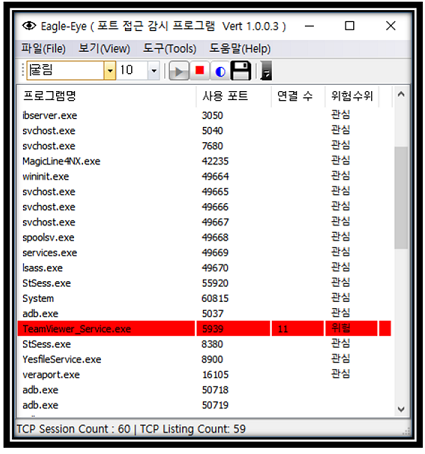
EagleEYEPort (TCP Port 모니터링)
|
|
카테고리 : 인터넷
사용OS : WIN64 |
등록회원 : KingT
등록일자 : 2019/1/30
|
조회수 : 41724
다운수 : 22
|
|
| 이글아이포트는 넷풀아이에서 일반 이용자를 위해서 만든 포트모니터링 프로그램입니다.
이글아이포트는 사용자 PC에서 열려있는 포트에 외부로부터의 접근 시도를 실시간 감시합니다.
이로써, 사용자는 PC에 외부에서의 해킹 시도를 실시간 파악할 수 있게 되어 PC를 안전하게 지킬 수 있게 도와주는 프로그램입니다.. |
|
|
|
|
|
[NVIDIA] GeForce v341.81 한글판 정식 드라이버 (Vista/Win7/Win8 64)
|
|
카테고리 : PC 공식드라이버
사용OS : WIN64 |
등록회원 : 제스트
등록일자 : 2015/8/28
|
조회수 : 47263
다운수 : 12
|
|
| 2015.8.24 일 자로 올라온 드라이버구요
용량은 269 메가
참고로 이전버전 제거하시고 현재버전 설치하시길 권장합니다
지포스 8100 부터 지포스 405 까지 설치하시면 됩니다
Vista/Win 7/Win 8/Win 8.1 64비트 전용
GeForce 400 Series:
GeForce 405
GeForce 300 Series:
GeForce GT 340, .. |
|
|
|
|
|
[NVIDIA] GeForce v341.81 한글판 정식 드라이버 (Vista/Win7/Win8 32)
|
|
카테고리 : PC 공식드라이버
사용OS : VISTA |
등록회원 : 제스트
등록일자 : 2015/8/28
|
조회수 : 46437
다운수 : 23
|
|
| 2015.8.24 일 자로 올라온 드라이버구요
용량은 216 메가
참고로 이전버전 제거하시고 현재버전 설치하시길 권장합니다
지포스 8100 부터 지포스 405 까지 설치하시면 됩니다
Vista/Win 7/Win 8/Win 8.1 32비트 전용
GeForce 400 Series:
GeForce 405
GeForce 300 Series:
GeForce GT 340, .. |
|
|
|
|
|
[NVIDIA] GeForce v355.60 WHQL 한글판 정식 드라이버 (Vista/Win7/Win8 64)
|
|
카테고리 : PC 공식드라이버
사용OS : WIN64 |
등록회원 : 제스트
등록일자 : 2015/8/14
|
조회수 : 44947
다운수 : 26
|
|
| 2015.8.13 일 자로 올라온 드라이버구요
용량은 279 메가
참고로 이전버전 제거하시고 현재버전 설치하시길 권장합니다
지포스 GT 420 이상 설치하시면 됩니다
Vista/Win 7/Win 8/Win 8.1 64비트 전용
GeForce 900 Series:
GeForce GTX 980 Ti, GeForce GTX 980, GeForce GTX 970, GeForce GTX 960.. |
|
|
|
|
|
[NVIDIA] GeForce v355.60 WHQL 한글판 정식 드라이버 (Vista/Win7/Win8 32)
|
|
카테고리 : PC 공식드라이버
사용OS : VISTA |
등록회원 : 제스트
등록일자 : 2015/8/14
|
조회수 : 43128
다운수 : 26
|
|
| 2015.8.13 일 자로 올라온 드라이버구요
용량은 218 메가
참고로 이전버전 제거하시고 현재버전 설치하시길 권장합니다
지포스 GT 420 이상 설치하시면 됩니다
Vista/Win 7/Win 8/Win 8.1 32비트 전용
GeForce 900 Series:
GeForce GTX TITAN X, GeForce GTX 980 Ti, GeForce GTX 980, GeForce G.. |
|
|
|
|
|
[NVIDIA] GeForce v355.60 WHQL 한글판 정식 드라이버 (XP 64)
|
|
카테고리 : PC 공식드라이버
사용OS : WINXP |
등록회원 : 제스트
등록일자 : 2015/8/14
|
조회수 : 42914
다운수 : 22
|
|
| 2015.8.13 일 자로 올라온 드라이버구요
용량은 239 메가
참고로 이전 버전 제거하시고 현재버전 설치하시길 권장합니다
지포스 GT420 이상이신분 설치하시면 됩니다
XP 64비트 전용
GeForce 900 Series:
GeForce GTX 960
GeForce 700 Series:
GeForce GTX TITAN Z, GeForce GTX TITAN Black, .. |
|
|
|
|
|
[NVIDIA] GeForce v355.60 WHQL 한글판 정식 드라이버 (XP)
|
|
카테고리 : PC 공식드라이버
사용OS : WINXP |
등록회원 : 제스트
등록일자 : 2015/8/14
|
조회수 : 46964
다운수 : 23
|
|
| 2015.8.13 일 자로 올라온 드라이버구요
용량은 194 메가
참고로 이전 버전 제거하시고 현재버전 설치하시길 권장합니다
지포스 GT420 이상이신분 설치하시면 됩니다
XP 전용
GeForce 900 Series:
GeForce GTX 960
GeForce 700 Series:
GeForce GTX TITAN Z, GeForce GTX TITAN Black, GeForce.. |
|
|
|
|
|
|
|
|
|