|
커뮤니티
|
|
커뮤니티 추천게시물
운영진 선정 | 추천순 | 최근댓글달린순 | 갤러리(포토)
커뮤니티 추천게시물
운영진 선정 | 추천순 | 최근댓글달린순 | 갤러리(포토)
커뮤니티 추천게시물
운영진 선정 | 추천순 | 최근댓글달린순 | 갤러리(포토)
커뮤니티 추천게시물
운영진 선정 | 추천순 | 최근댓글달린순 | 갤러리(포토)
|
|

|
|
|
 |
|
|
|
구글 크롬에서는 다운로드버튼이 작동하지 않으니, 엣지/익스플로러 등 다른브라우저를 사용하세요
|
|
다 아시는 것이라 스샷을 생략 합니다. 멀티쓰레드 지원하는 현존 최강 압축 프로그람 입니다.
버전별 변경 사항은 아래를 참조 하십시오.
Version 3.62
1. Bugs fixed:
a) stack overflow vulnerability has been corrected in WinRAR module
processing 7-Zip archives;
b) WinRAR GZip module could set a wrong file date when unpacking
GZip archives.
Version 3.61
1. Corrected a bug in multithreaded text compression module,
which under some circumstances might result in corrupt archived data.
This bug was present only in multithreaded mode and only
in WinRAR 3.60. RAR versions for other platforms are not affected.
2. Resolved a compatibility issue preventing WinRAR 3.60 to run
in Windows 95.
Version 3.60
1. Multithreaded version of RAR compression algorithm improves
the compression speed on computers with several CPU,
dual core CPU and processors with hyperthreading technology.
Multithreading is enabled by default, but you can disable it
in "General" part of "Settings" dialog.
In the command line mode you can control multithreading with
-mt switch.
2. WinRAR can display the folder tree panel allowing to navigate
in disk and archive folders. Use "Options/Folder tree" submenu
to enable the folder tree. It can be configured separately
in file and archive management modes.
Folder tree replaces "Browse for folder" command previously
available in "File" menu and uses its Ctrl+T keyboard shortcut.
3. Now WinRAR "Rename" command also works with ZIP archives.
Previous versions could rename files only in RAR archives.
4. Added decompression of LZH archives created with "-lh7-" algorithm.
5. New "Remove duplicate folders from extraction path" option
in "Settings/Compression" dialog.
If this option is on and you unpack an archive which root folder
has no files and only one 'somename' folder and if destination
folder is new or empty and also ends with '/somename', WinRAR
will exclude one 'somename' from resulting 'somename/somename' path.
6. New "Define volume sizes..." button in "Settings/Compression".
This button activates "Define volume sizes" dialog. Here you
can customize the list of predefined volume sizes associated
with "Split to volumes, bytes" field in archiving dialog.
7. Speed of RAR general compression increased for some data types.
Depending on data type and size the gain may achieve 5 - 15%.
8. New "Rename automatically" option in the extraction dialog
and command line -or switch to rename extracted files automatically
if file with the same name already exists. You can also enable
the auto-renaming mode directly from the overwrite confirmation
prompt with "Rename All" button.
Renamed files will get names like 'filename(N).txt',
where 'filename.txt' is the original file name and 'N' is a number.
9. "Set modification time" option in "Advanced" part of extraction
dialog is accessible also for ZIP archives. Previously it could be
changed only for RAR archives.
10. "Multithreading" option added to "Benchmark and hardware test"
command, so you can compare performance of usual and multithreaded
versions of RAR compression algorithm.
11. New 'ch' (change archive parameters) command line mode command.
Its purpose is to apply switches like -av, -tl and -cl to archive.
12. New 'cv' command line mode command. It provides the command line
interface to WinRAR "Convert archives" command. It is supported
only by winrar.exe, not by rar.exe.
13. New command line -sl and -sm switches to set size
limits of processing files.
14. New command line -fcu[file] switch allows to read archive
comments from Unicode files. It also modifies behavior
of "cw" command, setting the comment output format to Unicode.
15. 7Z added to list of formats stored without compression
when using -ms switch without a parameter.
16. Switch -e[+] is now supported by most of command line
operations including extracting and deleting files. Previously
it was supported by only archiving command.
17. It is allowed to use environment variables in archive name
in archiving dialog, in destination path in extraction dialog,
in folder names on "Compression" and "Paths" pages in WinRAR
settings. For example, you can enter '%temp%' in "Folder for
temporary files" field.
|
|
|
|
|
|

|
|
| |
다다얍 (postdada)
 / 2007-01-22 22:12 /
IP/
신고/
/ 2007-01-22 22:12 /
IP/
신고/

|
|
| |
좋은 압축유틸이죠^^
근데 영문의 압박이 ^^;;
|
|
|
 |

|
|
| |
Tuna☆09 (ohye701)
/ 2007-01-22 22:44 /
IP/
신고/
|
|
| |
한자나 일본어에 약한것만 뺴면 아주 좋은녀석이죠.
|
|
|
|

|
|
| |
일장춘몽 (sky0734)
/ 2007-01-22 22:54 /
IP/
신고/
|
|
| |
정식판이나왔군요.
|
|
|
|

|
|
| |
니 애미 (pmicro)
/ 2007-01-22 22:55 /
IP/
신고/
|
|
| |
아~ 참 정식 트라얼버전 입니다. 과자는 알아서 점방(?)에서 구하시길...
|
|
|
|

|
|
| |
카반 (avadakedavra) / 2007-01-22 23:05 /
IP/
신고/
|
|
| |
대세는 알집!!
|
|
|
|

|
|
| |
박장우 (backho79) / 2007-01-23 09:07 /
IP/
신고/
|
|
| |
저도 알집이 편한 ~_~
|
|
|
|

|
|
| |
당신기억 (bluemun)
/ 2007-01-23 10:18 /
IP/
신고/
|
|
| |
거의 사용한 적이 없어서.
|
|
|
|
|
|
|
|
|
|
|
|
|
|
자료실 엑티브엑스 컴포넌트 호환성문제 최종공지 등록일 : 2015/5/21 조회 : 42498
|
|
|
|
|
|
|
|
|
업로드 용량 1GB에서 2GB로 증량 안내 등록일 : 2012/8/29 조회 : 44188
|
|
|
|
|
|
|
|
|
다이렉트 링크 차단 안내 등록일 : 2011/8/17 조회 : 46258
|
|
|
|
|
|
|
|
|
자료실 파일 등록형식 대폭 확대 등록일 : 2010/12/31 조회 : 45782
|
|
|
|
|
|
|
|
|
전 자료 초고속 서버로 이전 업그레이드 안내 등록일 : 2010/7/29 조회 : 46328
|
|
|
|
|
|
|
|
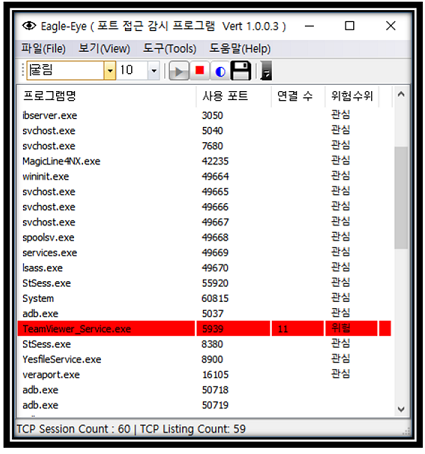
EagleEYEPort (TCP Port 모니터링)
|
|
카테고리 : 인터넷
사용OS : WIN64 |
등록회원 : KingT
등록일자 : 2019/1/30
|
조회수 : 41737
다운수 : 23
|
|
| 이글아이포트는 넷풀아이에서 일반 이용자를 위해서 만든 포트모니터링 프로그램입니다.
이글아이포트는 사용자 PC에서 열려있는 포트에 외부로부터의 접근 시도를 실시간 감시합니다.
이로써, 사용자는 PC에 외부에서의 해킹 시도를 실시간 파악할 수 있게 되어 PC를 안전하게 지킬 수 있게 도와주는 프로그램입니다.. |
|
|
|
|
|
[NVIDIA] GeForce v341.81 한글판 정식 드라이버 (Vista/Win7/Win8 64)
|
|
카테고리 : PC 공식드라이버
사용OS : WIN64 |
등록회원 : 제스트
등록일자 : 2015/8/28
|
조회수 : 47276
다운수 : 12
|
|
| 2015.8.24 일 자로 올라온 드라이버구요
용량은 269 메가
참고로 이전버전 제거하시고 현재버전 설치하시길 권장합니다
지포스 8100 부터 지포스 405 까지 설치하시면 됩니다
Vista/Win 7/Win 8/Win 8.1 64비트 전용
GeForce 400 Series:
GeForce 405
GeForce 300 Series:
GeForce GT 340, .. |
|
|
|
|
|
[NVIDIA] GeForce v341.81 한글판 정식 드라이버 (Vista/Win7/Win8 32)
|
|
카테고리 : PC 공식드라이버
사용OS : VISTA |
등록회원 : 제스트
등록일자 : 2015/8/28
|
조회수 : 46445
다운수 : 24
|
|
| 2015.8.24 일 자로 올라온 드라이버구요
용량은 216 메가
참고로 이전버전 제거하시고 현재버전 설치하시길 권장합니다
지포스 8100 부터 지포스 405 까지 설치하시면 됩니다
Vista/Win 7/Win 8/Win 8.1 32비트 전용
GeForce 400 Series:
GeForce 405
GeForce 300 Series:
GeForce GT 340, .. |
|
|
|
|
|
[NVIDIA] GeForce v355.60 WHQL 한글판 정식 드라이버 (Vista/Win7/Win8 64)
|
|
카테고리 : PC 공식드라이버
사용OS : WIN64 |
등록회원 : 제스트
등록일자 : 2015/8/14
|
조회수 : 44957
다운수 : 27
|
|
| 2015.8.13 일 자로 올라온 드라이버구요
용량은 279 메가
참고로 이전버전 제거하시고 현재버전 설치하시길 권장합니다
지포스 GT 420 이상 설치하시면 됩니다
Vista/Win 7/Win 8/Win 8.1 64비트 전용
GeForce 900 Series:
GeForce GTX 980 Ti, GeForce GTX 980, GeForce GTX 970, GeForce GTX 960.. |
|
|
|
|
|
[NVIDIA] GeForce v355.60 WHQL 한글판 정식 드라이버 (Vista/Win7/Win8 32)
|
|
카테고리 : PC 공식드라이버
사용OS : VISTA |
등록회원 : 제스트
등록일자 : 2015/8/14
|
조회수 : 43139
다운수 : 28
|
|
| 2015.8.13 일 자로 올라온 드라이버구요
용량은 218 메가
참고로 이전버전 제거하시고 현재버전 설치하시길 권장합니다
지포스 GT 420 이상 설치하시면 됩니다
Vista/Win 7/Win 8/Win 8.1 32비트 전용
GeForce 900 Series:
GeForce GTX TITAN X, GeForce GTX 980 Ti, GeForce GTX 980, GeForce G.. |
|
|
|
|
|
[NVIDIA] GeForce v355.60 WHQL 한글판 정식 드라이버 (XP 64)
|
|
카테고리 : PC 공식드라이버
사용OS : WINXP |
등록회원 : 제스트
등록일자 : 2015/8/14
|
조회수 : 42927
다운수 : 24
|
|
| 2015.8.13 일 자로 올라온 드라이버구요
용량은 239 메가
참고로 이전 버전 제거하시고 현재버전 설치하시길 권장합니다
지포스 GT420 이상이신분 설치하시면 됩니다
XP 64비트 전용
GeForce 900 Series:
GeForce GTX 960
GeForce 700 Series:
GeForce GTX TITAN Z, GeForce GTX TITAN Black, .. |
|
|
|
|
|
[NVIDIA] GeForce v355.60 WHQL 한글판 정식 드라이버 (XP)
|
|
카테고리 : PC 공식드라이버
사용OS : WINXP |
등록회원 : 제스트
등록일자 : 2015/8/14
|
조회수 : 46971
다운수 : 24
|
|
| 2015.8.13 일 자로 올라온 드라이버구요
용량은 194 메가
참고로 이전 버전 제거하시고 현재버전 설치하시길 권장합니다
지포스 GT420 이상이신분 설치하시면 됩니다
XP 전용
GeForce 900 Series:
GeForce GTX 960
GeForce 700 Series:
GeForce GTX TITAN Z, GeForce GTX TITAN Black, GeForce.. |
|
|
|
|
|
|
|
|
|